Free Max for Live devices (2026)
SAM has four free devices for Ableton Live 12: Orbit, Dream, Voice and Resonator. This page says what each one does, who it is for, and how to get it into a Live set.
1. The four free SAM devices
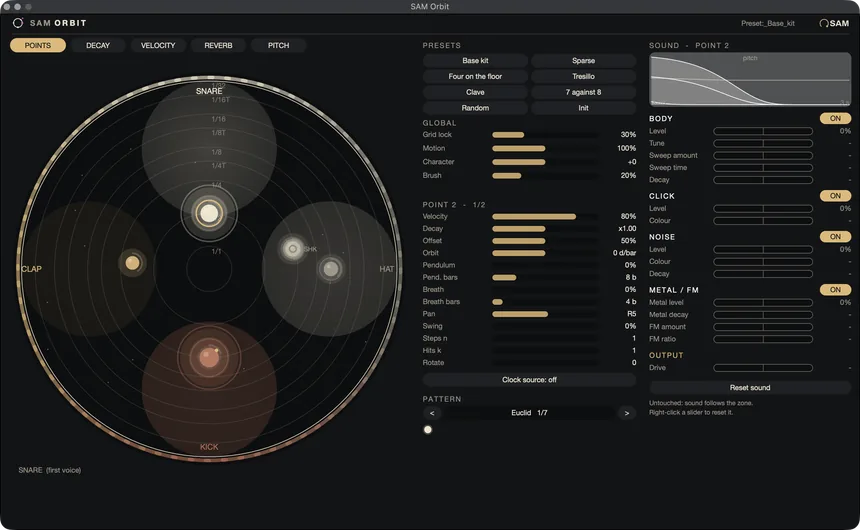
SAM Orbit (instrument)
What it does. A circular drum machine. Drums come from points on a circle: the angle of a point sets the sound (kick, clap, snare, hi-hat), its distance from the centre sets the speed. Up to 16 points, paintable maps for decay, velocity, reverb and pitch, Grid, Motion and Character controls, pattern export and import, 50 factory patterns and 24 sounds.
For whom. Anyone who wants drum patterns that do not come from a step grid.
Needs. Live 12 (Suite, or Standard with Max for Live, Max 9), macOS. No helper to install. SAM Orbit on maxforlive.com.
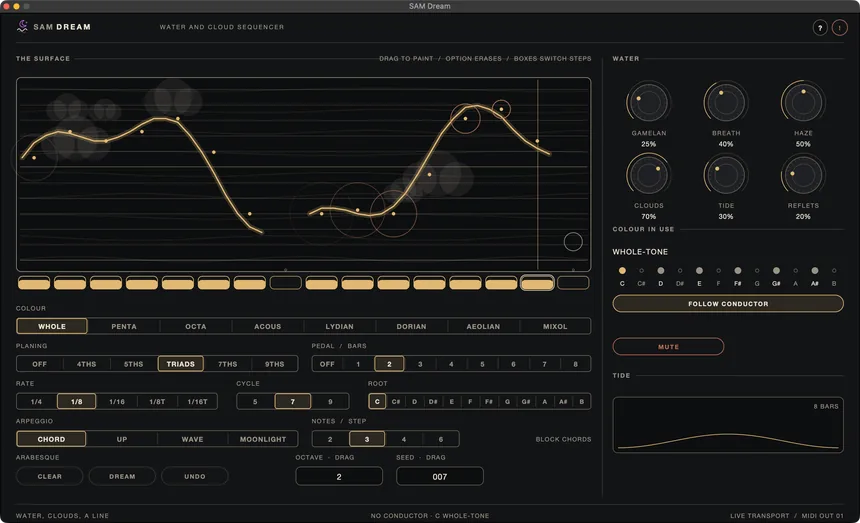
SAM Dream (MIDI effect)
What it does. A water sequencer. You draw a line on the water (48 columns, 16 steps) and the device plays it as parallel chords, with an optional pedal note and a gamelan ostinato. Eight colours from whole-tone to Mixolydian, 16 gates (one per step) and a Seed for repeatable results.
For whom. Composers who want chord movement and slow harmonic shapes by drawing, not by entering notes.
Needs. Live 12.2 or later (Suite, or Standard with Max for Live), Max 9, macOS 11 or later (Apple Silicon or Intel); Windows in beta. It follows SAM Conductor if one is in the set. SAM Dream on maxforlive.com.
SAM Voice (MIDI effect)
What it does. You play a gesture of one or two bars, Voice loops it and puts its pitches on the scale, stage by stage. Offset, stretch, direction, quantize, mirror, smooth and scatter change the loop. MPE output with an exact bend before every note, 72 factory presets.
For whom. Players who think in phrases rather than steps and want a loop that stays in the scale of the set.
Needs. Live 12 (Suite, or Standard with Max for Live, Max 9), macOS. Voice only follows, so it needs a leader in the set: SAM Conductor or SAM. SAM Voice on maxforlive.com.
SAM Resonator (audio effect)
What it does. Rings tuned resonators with your sound, on your scale. Four voices of 16 modal resonators each, twelve body types (Skin, Plate, Bar, String, Oak, Ceramic, Bronze, Glass, Marimba, Vibraphone, Tube, Frame), each voice on a scale degree and an octave, 72 factory presets and 48 Live parameters. It is one strip, with no editor window.
For whom. Sound designers who want drums, noise or a sample to ring in tune with the rest of the set.
Needs. Live 12 (Suite, or Standard with Max for Live, Max 9), macOS. It takes root and scale from SAM Conductor when one is in the set and uses its own root and scale (409 to choose from) when it is off. SAM Resonator on maxforlive.com.

2. SAM Conductor
SAM Conductor is free. It sits on one empty MIDI track and sets scale, root and octave for every SAM device in the set, from a list of 409 scales. It plays no notes. Of the free devices, Voice needs a leader like this; Dream and Resonator can follow it. Details are in the Learn lessons.
3. Getting them into Live
- Open the device page and use the free button. The shop lets you pay what you want, starting from zero.
- Put the .amxd file into your Live set: drag it onto a track, or keep it in your User Library so it shows up in the browser.
- Orbit is an instrument, so it goes on a MIDI track. Dream and Voice are MIDI effects: put them on a MIDI track with an instrument after them. For notes between the piano keys that instrument should have MPE on, with its bend range at 48 semitones. Resonator is an audio effect and goes on a track with sound running through it.
- For a shared scale, add SAM Conductor on an empty MIDI track. Devices with their Follow switch on take its scale and root.
To tune a synth or set up microtonal notes, see how to make microtonal music in Ableton Live.
4. On maxforlive.com
The four devices also have entries in the Max for Live library: SAM Orbit, SAM Dream, SAM Voice and SAM Resonator.
5. Going further
The free devices are a way to hear how SAM devices follow one scale before you decide on a paid one, such as the sequencers described in generative sequencers in Max for Live.
Try SAM free first. SAM Voice, Resonator, Orbit and Dream cost nothing.
Questions
Are there free Max for Live devices from SAM?
Yes, four: SAM Orbit (a circular drum instrument), SAM Dream (a MIDI sequencer you draw on water), SAM Voice (loops a played gesture onto the scale) and SAM Resonator (tuned resonators on your scale). They are listed at 0 in the shop, which lets you pay what you want, starting from zero.
Do the free devices need SAM Conductor?
Orbit works on its own. Dream can follow SAM Conductor but does not need it. Resonator follows the Conductor when one is in the set and uses its own root and scale when it is off. Voice is the exception: it only follows, so it needs SAM Conductor or SAM as a leader. SAM Conductor is free.
What do I need to run them?
Ableton Live 12 with Max for Live (Live Suite, or Standard with the Max for Live add-on) on macOS. SAM Dream needs Live 12.2 or later and macOS 11 or later. Some devices list Windows as a beta; check the device page.
Where else can I find them?
Each of the four also has an entry on maxforlive.com: SAM Orbit, SAM Dream, SAM Voice and SAM Resonator. The SAM shop is where the current version is.
Disclosure: SAM is built by Philip Krieger. The code is written with AI assistance. Competitor details on this page are taken from the products' official pages, status November 2026; check them for current features and prices.